Discover how SaaS for schools works in 2026, how to evaluate vendors, avoid common mistakes and implement school software successfully.
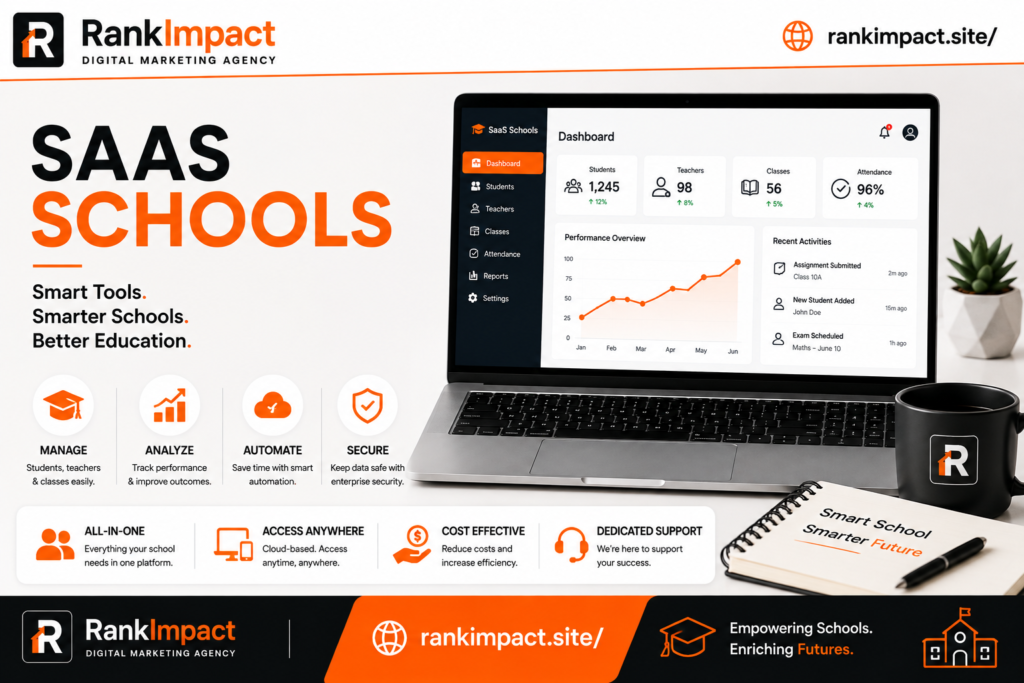
Table of Contents
SaaS for Schools A Complete Guide to Choosing and Implementing School Software
Schools today run on far more than textbooks and whiteboards. Behind every functioning classroom sits a stack of digital tools handling attendance grading communication and administration. This is where SaaS for schools has become one of the most important categories in education technology. Administrators teachers and IT coordinators are increasingly searching for software as a service solutions that reduce manual work improve communication with parents and give leadership real time visibility into how a school is performing academically and operationally.
If you are researching SaaS for schools right now you are likely one of three types of readers. You could be a school administrator trying to modernize outdated systems. You might be an IT director evaluating vendors and comparing features before a budget cycle closes. Or you could be an edtech founder trying to understand the market before building or selling into it. This guide is written to serve all three because the underlying questions are the same. What does SaaS actually mean in a school context. Which tools solve which problems. How do you avoid the common mistakes that waste budget and frustrate teachers. And how do you implement a new system without disrupting the school year.
What SaaS for Schools Actually Means
Software as a service is a delivery model where a school pays a subscription fee to access software hosted on the vendor’s servers rather than installing and maintaining software on its own machines. In a school setting this typically covers learning management systems student information systems communication platforms scheduling tools and financial administration software. The defining characteristic is that the school does not own physical servers or manage complex installations. Everything runs in the cloud and is accessed through a browser or app.
This matters enormously for schools because most educational institutions do not have large IT departments. A district with three schools might have one or two IT staff responsible for hundreds of devices and dozens of applications. SaaS for schools shifts the burden of maintenance security patching and uptime to the vendor allowing that small IT team to focus on classroom support rather than server management. It also means schools can start using a new tool within days rather than months since there is no hardware procurement or installation cycle involved.
Why Schools Are Moving to SaaS Faster Than Ever
The shift toward cloud based software in education accelerated dramatically during remote learning periods and it has not reversed. Teachers grew accustomed to digital gradebooks parent communication apps and online assignment submission and most have no interest in returning to paper based systems. Parents now expect real time updates on their child’s attendance and grades through a portal rather than a note sent home in a backpack.
Budget pressure is another driver. Traditional on premise software often required upfront licensing costs hardware purchases and ongoing maintenance contracts that strained already tight education budgets. Subscription based SaaS pricing spreads cost predictably across the year and often scales with enrollment which makes financial planning easier for business managers. Many vendors also offer tiered pricing specifically designed for the education sector recognizing that public schools operate under different financial constraints than private companies.
Data driven decision making has also pushed adoption. Administrators are under pressure to demonstrate measurable outcomes and modern SaaS platforms for schools include dashboards and reporting features that make it far easier to track attendance trends grade distributions and intervention outcomes than manually compiled spreadsheets ever could.
The Core Categories of SaaS Tools Schools Actually Use
Not every school needs every category of software but understanding the landscape helps when building a technology roadmap. Student information systems form the backbone of most school operations handling enrollment records grades transcripts and scheduling. Learning management systems focus on delivering coursework assignments and assessments to students and are especially critical for hybrid or blended learning models. Communication platforms connect teachers administrators and parents through messaging portals and automated notifications replacing the fragmented mix of emails phone calls and paper flyers many schools relied on for years.
Financial and administrative software handles budgeting payroll and procurement while HR platforms manage staff records certifications and professional development tracking. Assessment and analytics tools measure student progress against standards and increasingly use predictive indicators to flag students who may need additional support before they fall significantly behind. Choosing SaaS for schools effectively usually means selecting one strong tool in each essential category rather than trying to find a single platform that does everything adequately but nothing exceptionally.
How to Evaluate a SaaS Vendor for Your School
Evaluating vendors is where many schools go wrong because they focus almost entirely on feature lists rather than fit and support quality. A feature rich platform that your teachers find confusing or that lacks responsive customer support during the first month of school will cause more harm than a simpler tool that works reliably.
Start by mapping your actual pain points before looking at any vendor website. Write down the specific problems you are trying to solve whether that is inconsistent attendance tracking across buildings slow parent communication or fragmented student records spread across multiple legacy systems. A vendor demo becomes far more useful when you can ask directly how their product solves your documented problems rather than being swept along by a generic feature tour.
Data privacy and compliance deserve serious scrutiny given how much sensitive student information flows through these systems. In the United States this means confirming compliance with FERPA and, where relevant, COPPA for platforms used by younger students. Ask vendors directly where data is stored how it is encrypted and what happens to your school’s data if you ever cancel the subscription. A reputable vendor will have clear documented answers rather than vague reassurances.
Integration capability is another area schools underestimate. A new tool that cannot connect to your existing student information system or single sign on provider creates duplicate data entry and frustrated staff. Ask specifically about API access and existing integrations with the systems you already run before signing a contract.
Finally evaluate the vendor’s education specific experience. A company that primarily serves corporate clients and has recently added an education tier often lacks the nuanced understanding of academic calendars grading periods and compliance requirements that education focused vendors have built into their product over years of iteration.
Common Mistakes Schools Make When Adopting SaaS Tools
The most frequent mistake is purchasing software based on a compelling sales demo without involving the teachers and staff who will use it daily. Administrators sometimes select a platform that looks impressive in a boardroom presentation but proves cumbersome in an actual classroom with thirty students and a fifty minute period. Involving a small group of teachers in the evaluation process before purchase dramatically improves adoption rates after rollout.
Underestimating training time is another common misstep. Schools often introduce new software during the first week of the academic year when staff are already overwhelmed with orientation activities and returning students. A far more effective approach is training staff during the summer with follow up sessions scheduled during the first few weeks once real usage questions emerge naturally.
Many schools also fail to designate a clear internal champion for each new tool. Without someone responsible for answering day to day questions troubleshooting minor issues and communicating updates from the vendor adoption tends to fragment with different teachers using the tool in inconsistent ways or abandoning it altogether when they hit a small obstacle.
Ignoring total cost of ownership is a financial mistake that shows up later. The advertised subscription price rarely includes implementation fees data migration costs training time or the cost of integrating with existing systems. Requesting a complete cost breakdown before signing prevents unpleasant budget surprises mid year.
Finally schools sometimes accumulate too many overlapping tools over several years of piecemeal purchasing decisions. Conducting an annual audit of active software subscriptions often reveals redundant tools serving the same function purchased by different departments at different times which quietly drains budget that could be better spent elsewhere.
Best Practices for a Smooth SaaS Implementation
A phased rollout consistently outperforms an all at once launch. Piloting a new platform with one grade level or one department for a semester allows the school to identify and fix workflow issues before expanding school wide, and it produces internal champions who can help train colleagues during the broader rollout.
Clear communication with parents matters more than schools often anticipate particularly for tools that change how they receive information about their children. A short explanatory email or orientation video sent before launch significantly reduces confused calls to the front office during the first weeks of use.
Building in regular check ins with the vendor during the first semester helps surface issues early. Many education focused SaaS companies offer a dedicated customer success contact for schools and scheduling monthly calls during the initial rollout period ensures small problems get addressed before they become reasons for staff to abandon the tool.
Documenting internal processes as they are built prevents knowledge loss when staff turn over, which happens frequently in education. A simple shared document outlining how attendance is entered how grades sync or how parent accounts are created saves enormous time when a new staff member takes over a role mid year.
Pricing Models and Budget Considerations
Most SaaS for schools pricing follows a per student or per user annual subscription model though some vendors charge flat institutional rates for smaller schools. Per student pricing scales naturally with enrollment which works well for growing districts but can become expensive quickly for larger schools, so requesting volume discount tiers during negotiation is worthwhile once enrollment crosses a few hundred students.
Many vendors offer separate tiers distinguishing basic functionality from premium features like advanced analytics or additional integrations. Schools should resist the temptation to purchase the highest tier immediately and instead start with core functionality, upgrading only once staff have demonstrated they are using the base features consistently and would genuinely benefit from additional capability.
Grant funding and state technology allocations often specifically cover education software purchases and it is worth checking with your business office whether current subscriptions could be reimbursed or funded through existing grant programs before assuming the full cost must come from the general operating budget.
Security and Data Privacy Considerations Specific to Education
Schools hold an unusually sensitive combination of data including minors personal information academic records and in many cases health related accommodations. This makes security diligence non negotiable when selecting any SaaS platform. Beyond confirming regulatory compliance schools should ask vendors about their data breach notification policy, how quickly they patch known vulnerabilities and whether they undergo independent security audits.
Single sign on integration deserves particular attention because it reduces the number of passwords students and staff must manage which in turn reduces both security risk and support requests to the IT department. Most established education SaaS vendors support integration with common identity providers and this should be treated as a near mandatory requirement rather than a nice to have feature during vendor selection.
The Future of SaaS in Education
Artificial intelligence features are increasingly built directly into education SaaS platforms, from automated essay feedback to predictive analytics identifying students at risk of falling behind. Schools evaluating new platforms should ask vendors how these features work, what data trains them and how much human oversight remains part of the process, since transparency here is still uneven across the market.
Interoperability standards are also improving, with more vendors building around common education data standards that make switching platforms or connecting multiple tools significantly less painful than it was even five years ago. This trend benefits schools directly by reducing vendor lock in and making the overall SaaS for schools ecosystem more flexible over time.
Frequently Asked Questions
What does SaaS mean in an education context?
SaaS in education refers to cloud hosted software that schools access through a subscription rather than installing on their own servers, covering tools like student information systems learning management platforms and communication apps.
Is SaaS for schools more affordable than traditional software?
For most schools yes, since SaaS eliminates large upfront hardware and licensing costs in favor of predictable subscription pricing, though total cost of ownership should always include training and integration expenses.
How long does it take to implement a new SaaS platform in a school?
A typical implementation ranges from a few weeks for simple communication tools to a full semester for comprehensive student information system migrations, depending on data migration complexity and staff training needs.
What is the difference between a learning management system and a student information system?
A learning management system focuses on delivering coursework assignments and assessments to students, while a student information system manages enrollment records grades transcripts and scheduling at an administrative level.
How do schools ensure SaaS platforms comply with student data privacy laws?
Schools should confirm FERPA and, where applicable, COPPA compliance directly with vendors, review data storage and encryption practices and ensure contracts specify what happens to data if the subscription ends.
What is the biggest reason SaaS implementations fail in schools?
Insufficient staff training and lack of teacher involvement during vendor selection are the most common reasons adoption fails, since tools chosen without frontline input often do not match actual classroom workflows.
Can small schools afford enterprise level SaaS tools?
Many education focused vendors offer tiered pricing specifically designed for smaller institutions, and it is worth negotiating directly since list pricing is rarely the final offer for education buyers.
Should schools choose one all in one platform or multiple specialized tools?
Most schools achieve better results choosing one strong specialized tool per core function such as attendance grading and communication rather than one platform attempting to do everything moderately well.
How often should a school review its SaaS software subscriptions?
An annual audit is recommended to identify redundant tools underused subscriptions and opportunities to consolidate spending before the next budget cycle begins.
What questions should a school ask before signing a SaaS contract?
Schools should ask about data ownership and portability, integration capabilities with existing systems, total implementation cost beyond the subscription fee and what dedicated support is available during the first semester of use.
Conclusion
Choosing the right SaaS for schools is less about finding the platform with the longest feature list and more about matching real institutional needs to tools that staff will actually use consistently. The schools that see the strongest results are the ones that involve teachers early, plan training realistically, scrutinize data privacy seriously and treat vendor selection as an ongoing relationship rather than a one time purchase decision. Approached this way SaaS for schools becomes a genuine operational advantage rather than another underused subscription sitting quietly in the budget.
Key Takeaways
SaaS for schools shifts software maintenance and hosting responsibility to the vendor which particularly benefits schools with limited IT staff. Successful adoption depends far more on teacher involvement and training quality than on feature comparisons alone. Data privacy compliance including FERPA should be verified directly with every vendor before signing a contract. A phased rollout starting with one grade level or department consistently produces better long term adoption than a school wide launch. Annual audits of existing software subscriptions help schools avoid paying for redundant overlapping tools year after year.