Explore real crm systems examples across operational analytical and collaborative categories with use cases best practices and buying tips for 2026.
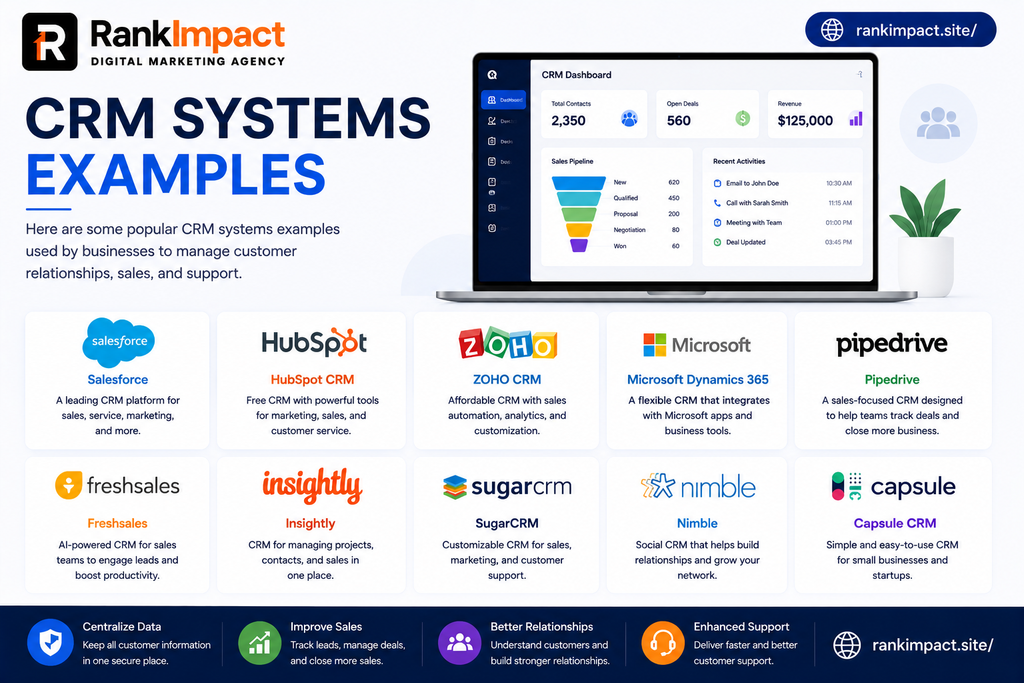
Table of Contents
Understanding CRM Systems Before Comparing Examples
A CRM system is more than a digital address book. At its core it is software designed to capture, organize, and act on every interaction a business has with a lead or customer, including emails, calls, purchases, support tickets, and marketing touchpoints. What separates one CRM system from another is often not the basic contact management functionality, since almost every system on the market can do that reasonably well, but rather how the system is architected around a specific business goal. Some systems are built primarily to automate sales workflows, others are built to analyze large volumes of customer data for strategic decisions, and others are built specifically to keep multiple departments aligned around the same customer information. Understanding these underlying categories before comparing individual products makes it much easier to evaluate whether a system will actually solve your business problem rather than just adding another tool to your technology stack.
Operational CRM Systems and Real Examples
Operational CRM systems focus on automating and streamlining the day to day processes involved in sales, marketing, and customer service. These systems are built around workflows, meaning they help teams move leads through a pipeline, trigger follow up tasks automatically, and reduce the manual work involved in managing customer relationships at scale. Pipedrive is a strong example of an operational CRM system, since its entire design centers around visualizing and automating the sales pipeline so reps can focus on moving deals forward rather than manually tracking where each opportunity stands. Keap is another clear example, built specifically around automating repetitive marketing and follow up tasks for small businesses, such as automatically tagging leads based on behavior and triggering personalized email sequences without manual intervention. Businesses that struggle most with manual, repetitive administrative work in their sales or marketing process typically benefit the most from an operational CRM system, since the primary value comes from removing friction out of daily tasks rather than from deep data analysis.
Analytical CRM Systems and Real Examples
Analytical CRM systems place their emphasis on collecting and interpreting large volumes of customer data to guide strategic business decisions, rather than simply automating day to day tasks. These systems typically include strong reporting, forecasting, and customer segmentation capabilities that help leadership teams understand patterns across their entire customer base. Salesforce Sales Cloud, particularly when paired with its advanced analytics tools, is a strong example of an analytical CRM system, since larger organizations frequently use it to identify which customer segments generate the most revenue, forecast future sales trends, and understand which sales activities most reliably lead to closed deals. Microsoft Dynamics 365 also functions strongly as an analytical system, especially for enterprises that combine CRM data with broader operational data to generate deep business intelligence across sales, finance, and customer service simultaneously. Companies with large customer bases and complex reporting needs, especially those that rely on data driven forecasting to guide strategic planning, tend to get the most value from a system built with strong analytical capabilities at its core.
Collaborative CRM Systems and Real Examples
Collaborative CRM systems are built primarily to ensure that different departments within a business, such as sales, marketing, and customer support, share the same customer information seamlessly instead of working from disconnected records. The goal of a collaborative system is to eliminate the miscommunication that happens when a support team has no visibility into a customer past sales conversations, or when a marketing team cannot see which leads eventually became paying customers. HubSpot CRM is a excellent example of a collaborative system, since its architecture was specifically designed to unify marketing, sales, and service data inside one shared record for every contact, allowing a support agent to instantly see a customer full history before responding to an issue. Zoho CRM also performs strongly as a collaborative system, particularly when paired with its broader suite of connected business applications, giving departments across an organization access to the same customer data without needing separate integrations. Businesses where sales, marketing, and support teams frequently need visibility into each other’s interactions with the same customers should prioritize a system with strong collaborative functionality above all else.
Industry Specific CRM Systems and Real Examples
Beyond the three core categories, many CRM systems have been purpose built or heavily customized for specific industries, and understanding these examples helps businesses in specialized fields avoid forcing a generic system into a workflow it was never designed for. Real estate businesses commonly rely on systems like Zoho CRM or specialized platforms built specifically around property listings, buyer matching, and long multi touch sales cycles unique to real estate transactions. Healthcare organizations often require CRM systems with strong compliance features built in, since patient related communication needs to meet strict privacy regulations that a generic sales focused CRM may not adequately support. Financial services firms frequently choose systems like Salesforce Financial Services Cloud, which extends standard CRM functionality with features built specifically around compliance tracking, household level relationship mapping, and the longer term client relationships typical in wealth management and insurance. Recognizing that your industry may benefit from a specialized or heavily customized system, rather than assuming every business needs the same generic CRM, can save significant time and frustration during implementation.
Cloud Based Versus On Premise CRM Systems
Deployment model is another important lens for understanding CRM systems examples, since where a system runs and how it is maintained significantly affects cost, flexibility, and long term scalability. Cloud based CRM systems, sometimes called software as a service systems, are hosted entirely by the vendor and accessed through a web browser, meaning businesses avoid the cost and complexity of maintaining physical servers or dedicated IT infrastructure. HubSpot, Pipedrive, and Zoho CRM are all delivered as cloud based systems, which makes them significantly faster to set up and easier to scale as a business grows, since new users and features can typically be added without any infrastructure changes. On premise CRM systems, by contrast, are installed and maintained on a company’s own servers, giving the organization complete control over data storage and security configuration, which can matter significantly for businesses in highly regulated industries or with strict internal data policies. The tradeoff is that on premise systems require dedicated IT resources to maintain, update, and secure, making them a realistic option mainly for larger enterprises with the technical infrastructure and staff to support that ongoing responsibility.
How Businesses Actually Use CRM Systems Day to Day
Looking at how real teams use these systems on a daily basis helps illustrate why the underlying category matters so much more than the specific product name. A sales development representative at a software company might spend their morning inside an operational CRM system like Pipedrive, working through a queue of automatically prioritized leads and logging call notes directly into the pipeline as deals move forward. Later that same day, a sales operations manager might log into an analytical CRM system like Salesforce to review a dashboard showing which lead sources are converting at the highest rate this quarter, using that insight to adjust where marketing budget gets allocated. Meanwhile, a customer support agent working inside a collaborative CRM system like HubSpot might pull up a customer record and instantly see every past sales conversation and support ticket before responding to a new inquiry, avoiding the frustration of asking a customer to repeat information they have already shared. These three examples happening within the same broader customer relationship illustrate why understanding system categories, rather than treating all CRM software as interchangeable, leads to much smarter purchasing decisions.
Common Mistakes When Evaluating CRM Systems
One of the most common mistakes businesses make is choosing a CRM system based on a competitor’s recommendation without first identifying whether their own primary challenge is operational, analytical, or collaborative in nature, which often results in paying for capabilities the business never actually uses. Another frequent error is underestimating the importance of data migration during a system change, since moving from an old CRM or spreadsheet system into a new platform without a clear data cleaning plan usually results in duplicate records and inaccurate reporting from the very first day. Many businesses also make the mistake of selecting an enterprise grade analytical system when their actual challenge is simple sales process automation, leading to a much steeper learning curve and slower adoption than a lighter operational system would have required. Skipping a genuine trial period with real business data, and instead relying only on sales demos filled with sample records, is another mistake that frequently leads to buyer’s remorse once daily use reveals gaps the demo never surfaced. Finally, many organizations fail to plan for how their needs will evolve, choosing a system that fits today’s small team perfectly but cannot scale reporting or automation capabilities as the business grows over the following few years.
Best Practices for Choosing and Implementing a CRM System
The most successful CRM implementations typically start with a clear internal audit of existing processes, identifying exactly where manual work, miscommunication, or missing data are causing the most friction before evaluating any specific software. Involving the actual end users, including sales reps and support agents who will use the system daily, in the evaluation and selection process significantly improves adoption rates compared to a system chosen entirely by leadership without frontline input. Setting a realistic implementation timeline that includes proper data migration, staff training, and a phased rollout rather than an all at once launch helps prevent the confusion and resistance that often derail new system adoption. It also helps to define clear, measurable goals before implementation begins, such as reducing average deal cycle time or improving response time on support tickets, so the business can objectively evaluate whether the new system is delivering real value within the first few months. Finally, building in a regular review cadence after launch, checking in at thirty, sixty, and ninety days to address adoption gaps or workflow issues early, dramatically increases the odds that a new CRM system becomes a lasting operational improvement rather than an expensive tool that quietly falls out of use.
Choosing the Right CRM System for Your Business Stage
Early stage businesses and startups generally benefit most from lightweight operational systems like Pipedrive or the free tier of HubSpot, since the priority at this stage is simply getting organized without adding unnecessary complexity or cost. Growing mid sized businesses often find that a collaborative system like HubSpot or Zoho CRM becomes increasingly valuable as more departments start interacting with the same customers and need shared visibility into those relationships. Larger organizations managing complex reporting needs, multiple business units, or large sales teams typically require the deeper analytical capabilities found in systems like Salesforce or Microsoft Dynamics 365, even though these systems demand a larger investment in setup and ongoing administration. Businesses operating in specialized or heavily regulated industries should prioritize systems with strong industry specific functionality or compliance features over generic platforms, even if that means paying a premium compared to more general purpose alternatives. Matching your current business stage and specific pain points to the right system category, rather than defaulting to whichever brand is most well known, consistently produces better long term outcomes than choosing based on popularity alone.
Frequently Asked Questions
What are some examples of CRM systems Common crm systems examples include Salesforce, HubSpot CRM, Zoho CRM, Pipedrive, Microsoft Dynamics 365, and Keap, each representing a different category of system built around operational automation, analytical reporting, or collaborative data sharing.
What are the three main types of CRM systems The three main types are operational CRM systems which automate sales and marketing workflows, analytical CRM systems which focus on data analysis and reporting, and collaborative CRM systems which unify customer information across different departments.
What is the most widely used CRM system Salesforce is generally considered the most widely used CRM system globally, particularly among mid sized to large enterprises, due to its extensive customization options and broad ecosystem of integrations.
Is HubSpot considered a CRM system Yes, HubSpot is a full CRM system that combines contact management, sales pipeline tracking, and marketing automation into one platform, and it is especially known for its accessible free tier for small businesses.
How do I choose the right CRM system for my business Choosing the right system starts with identifying whether your biggest challenge is process automation, data analysis, or cross department collaboration, then selecting a system built around that specific strength rather than choosing based on brand popularity alone.
What is the difference between a CRM system and CRM software CRM system and CRM software are generally used interchangeably to describe the same category of technology, though system sometimes refers more broadly to the overall process and structure while software refers to the specific application itself.
Can small businesses benefit from CRM systems Yes, small businesses often benefit significantly from CRM systems, even lightweight operational ones, since organizing customer data and automating basic follow up tasks can meaningfully improve conversion rates even with a very small team.
What industries use specialized CRM systems Real estate, healthcare, and financial services are among the industries that frequently rely on specialized or heavily customized CRM systems built around their unique compliance requirements and sales cycle structures.
How long does it take to implement a new CRM system Implementation timelines vary widely depending on business size and data complexity, but small businesses can often be fully operational within a few weeks while larger enterprise implementations may take several months.
Do CRM systems integrate with other business tools Most modern CRM systems offer integrations with email platforms, calendar tools, accounting software, and marketing automation tools, allowing businesses to connect their CRM with the rest of their existing technology stack.
Conclusion
Understanding real crm systems examples across different categories gives you a far more useful foundation for making a purchasing decision than simply comparing a list of product names and prices. Operational systems like Pipedrive and Keap excel at automating daily workflows, analytical systems like Salesforce and Microsoft Dynamics 365 shine when data driven decision making is the priority, and collaborative systems like HubSpot and Zoho CRM keep departments aligned around shared customer information. Layering in deployment model considerations and industry specific needs adds another important dimension to the decision, since the right system for a fast growing startup looks very different from the right system for a regulated financial services firm. Take the time to clearly identify your organization’s biggest operational challenge before comparing specific products, involve the people who will use the system daily in your evaluation process, and choose a system built around the category of problem you are actually trying to solve.
Key Takeaways
CRM systems generally fall into three main categories including operational systems focused on automation, analytical systems focused on data and reporting, and collaborative systems focused on cross department visibility.
Pipedrive and Keap are strong examples of operational CRM systems built to automate daily sales and marketing workflows.
Salesforce and Microsoft Dynamics 365 represent strong analytical CRM systems suited to businesses with complex reporting and forecasting needs.
HubSpot and Zoho CRM serve as excellent examples of collaborative systems that unify customer data across sales marketing and support teams.
Industry specific systems exist for fields like real estate, healthcare, and financial services, offering compliance and workflow features generic systems often lack.
Choosing between cloud based and on premise deployment depends heavily on internal IT resources and specific data security requirements.
The most successful CRM implementations start with a clear internal audit of existing challenges rather than choosing a system based on popularity or a competitor’s recommendation.