Explore the best crm software examples for 2026 including Salesforce HubSpot Zoho and Pipedrive with real business use cases and buying tips.
What CRM Software Actually Does For a Business
Customer relationship management software is the central system where a company stores every interaction it has with a lead or customer. That includes emails, calls, meeting notes, deal stages, support tickets, and purchase history. Instead of scattering this information across spreadsheets, inboxes, and sticky notes, a CRM pulls it into one organized record for every contact. Sales teams use it to track deals as they move through a pipeline. Marketing teams use it to see which campaigns actually turned into paying customers. Support teams use it to understand a customer full history before responding to a ticket. The real value is not the software itself but the visibility it gives every department into the same customer story, which reduces miscommunication and helps teams close deals faster and retain customers longer.
Salesforce Sales Cloud
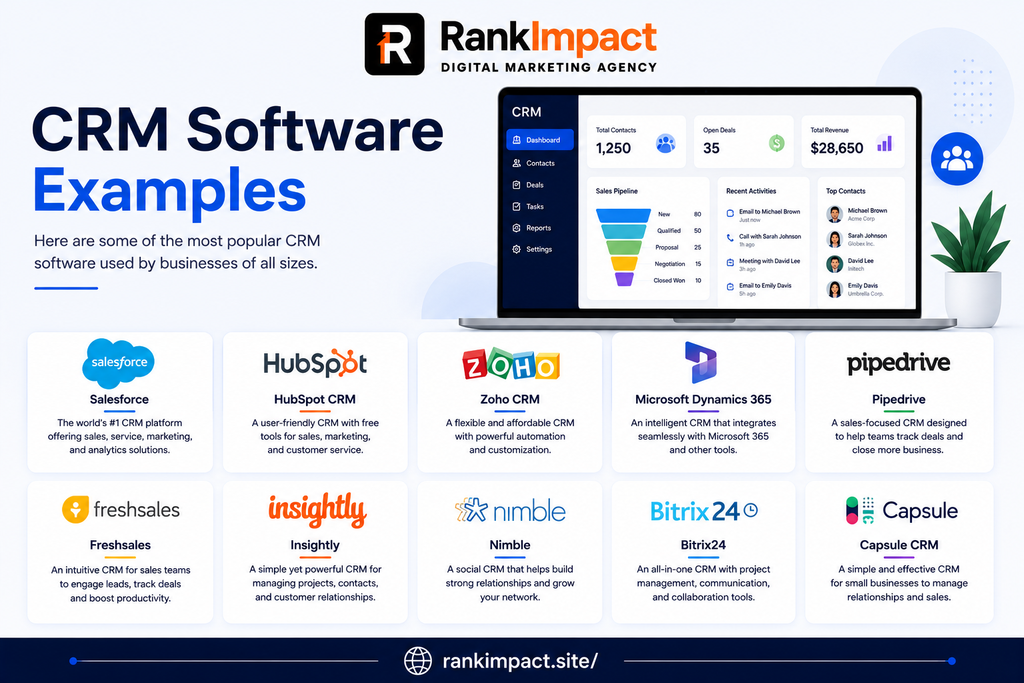
Salesforce is the name most people think of first when they hear customer relationship management, and for good reason. It is used by companies ranging from small startups to Fortune 500 enterprises because it can be customized to fit almost any sales process imaginable. A mid sized software company might use Salesforce to build a fully automated lead scoring system that routes hot prospects straight to the right sales rep within seconds of a form submission. Larger enterprises often use it to connect dozens of internal tools through its AppExchange marketplace, creating a single hub for sales, service, and marketing data. The tradeoff is that Salesforce has a steeper learning curve and often requires a dedicated administrator or consultant to configure properly, which makes it a better fit for teams with the budget and technical resources to unlock its full potential rather than a solo founder just getting started.
HubSpot CRM
HubSpot built its reputation on offering a genuinely useful free tier, which makes it one of the most common entry points for small businesses trying their first real CRM. A three person marketing agency can start tracking every client email and deal stage without paying a cent, then gradually add HubSpot marketing or service tools as the business grows. What sets HubSpot apart in practice is how tightly its CRM integrates with content marketing, email campaigns, and website tracking, so a sales rep can see exactly which blog post or pricing page a lead visited before their last call. This makes it especially popular among SaaS companies and marketing agencies that live and breathe inbound lead generation. The downside some growing teams run into is that costs can climb quickly once you need the more advanced sales and marketing hubs, so it is worth mapping out expected usage before scaling up.
Zoho CRM
Zoho CRM has become a favorite among cost conscious small and mid sized businesses because it delivers a huge feature set at a fraction of the price of bigger competitors like Salesforce. A regional real estate brokerage might use Zoho to manage hundreds of property leads, automatically assign new inquiries to available agents, and trigger follow up reminders so no lead goes cold. Zoho also plays well with its own suite of business apps, including accounting and email marketing tools, which appeals to companies that want one vendor handling multiple operational needs instead of stitching together five different subscriptions. Some users find the interface less polished than newer competitors, but the depth of customization available at its price point keeps it firmly on the shortlist for budget conscious teams.
Pipedrive
Pipedrive was designed from day one around a simple idea, that salespeople think in visual pipelines, not spreadsheets. A boutique consulting firm running a handful of active deals at any given time can drag and drop opportunities across pipeline stages and instantly see what needs attention today. This visual first approach makes Pipedrive one of the easiest CRMs to onboard a new sales hire on, often within a single afternoon rather than a full week of training. It is particularly popular with small sales teams that want a tool built specifically for closing deals rather than a sprawling platform trying to do everything at once. Where it falls short is in marketing automation and customer service functionality, so companies that need those capabilities usually pair Pipedrive with separate specialized tools.
Microsoft Dynamics 365
Microsoft Dynamics 365 appeals strongly to enterprises already deeply invested in the Microsoft ecosystem, including Outlook, Teams, and Excel. A manufacturing company that runs its entire operation on Microsoft tools can connect Dynamics 365 directly into existing workflows, letting sales reps log calls and update deal records without ever leaving their inbox. Its strength lies in combining CRM functionality with enterprise resource planning features, giving large organizations a single platform that spans sales, finance, and supply chain data. This depth comes with real complexity though, and implementation projects for Dynamics 365 often take months and involve specialized consultants, making it a realistic option mainly for larger organizations with dedicated IT teams rather than small businesses looking for a quick setup.
Freshsales
Freshsales, built by Freshworks, has carved out a niche among businesses that want built in artificial intelligence features without paying for a separate add on. A subscription box company might use Freshsales built in lead scoring to automatically flag which trial users are most likely to convert to paying customers, based on how they interact with the product. The platform also includes built in phone and email tools, so smaller teams do not need to purchase and integrate a separate calling system just to make it functional. Freshsales tends to appeal most to teams that want a modern, clean interface and quick setup, though very large enterprises with complex multi department workflows may eventually outgrow some of its more advanced customization limits compared to platforms like Salesforce.
Monday Sales CRM
Monday Sales CRM grew out of the popular Monday work management platform, which means it brings a highly visual, flexible board style layout to customer relationship management. A creative agency managing both client projects and sales pipelines might appreciate being able to see deals, tasks, and project timelines in the same connected workspace instead of switching between separate tools. Its drag and drop customization lets teams build a CRM structure that matches their exact process rather than forcing them into a rigid predefined pipeline. Because it started as a general project management tool, some sales specific features like advanced forecasting are less mature than dedicated CRM platforms, but for teams that value flexibility and already use Monday for other work, the CRM add on removes friction between departments.
Insightly
Insightly positions itself as a strong middle ground option for small and mid sized businesses that need both CRM and basic project management in a single tool. A design studio that needs to track new client leads and then hand off won deals into an execution phase with tasks and milestones can do both inside Insightly without buying a second piece of software. This makes it especially attractive to service based businesses where the sales process and the delivery process are closely linked. Insightly also offers solid workflow automation for its price tier, letting teams automatically create follow up tasks or send internal notifications when a deal changes stage. Companies with very complex sales cycles involving many stakeholders sometimes find its reporting less robust than enterprise focused platforms.
Copper CRM
Copper was built specifically to integrate deeply with Google Workspace, which makes it a natural choice for businesses that already run their entire operation through Gmail, Google Calendar, and Google Drive. A digital marketing agency living inside Gmail all day can see and update CRM records directly from their inbox without switching tabs, which significantly reduces the friction that normally causes sales teams to neglect data entry. Copper automatically logs emails and meetings against the right contact record, cutting down on manual admin work that eats into selling time. Teams that do not use Google Workspace as their primary suite generally will not see the same seamless experience and might be better served by a more platform agnostic CRM instead.
Keap
Keap, formerly known as Infusionsoft, focuses heavily on combining CRM with marketing automation specifically for small businesses and solo entrepreneurs. A course creator or online coach can use Keap to automatically tag a new lead based on which lead magnet they downloaded, then trigger a personalized nurture email sequence without any manual follow up. This makes Keap particularly popular among small service businesses and online educators who need marketing automation firepower without hiring a dedicated marketing operations person. The tradeoff is that Keap tends to be priced higher than comparable entry level CRMs, positioning it more as an investment for businesses that are ready to lean heavily into automated sales and marketing workflows rather than those just testing the waters.
How to Choose the Right CRM for Your Business
Picking a CRM should start with an honest look at your current sales process rather than a feature checklist. A five person team closing a handful of large deals each month has completely different needs than a hundred person team processing thousands of smaller transactions, so the size and complexity of your pipeline should guide your first filter. Next, consider which tools your team already lives inside every day, because a CRM that integrates naturally with your existing email, calendar, and communication tools will get adopted far more consistently than one that requires constant tab switching. Budget matters too, but it should be evaluated against total cost of ownership rather than just the advertised monthly price, since some platforms charge extra for automation, reporting, or user seats that quickly add up. Finally, always run a real trial with your actual sales data before committing, because a demo environment full of sample records rarely reveals how a tool will feel once your genuine day to day chaos is loaded into it.
Common Mistakes Businesses Make When Choosing CRM Software
One of the most frequent mistakes companies make is choosing a CRM based purely on brand recognition rather than actual fit for their sales process, which often leads to paying for enterprise features that never get used. Another common error is skipping proper data migration planning, resulting in incomplete or duplicate contact records that make the new system feel messy from day one and quietly erode team trust in the data. Many businesses also underestimate the importance of user adoption, rolling out a powerful new CRM without adequate training, which causes sales reps to quietly revert back to spreadsheets or personal notes within a few weeks. Overcomplicating the initial setup is another trap, since teams that try to build every possible automation and custom field before ever using the system in daily practice often delay launch for months and lose momentum. The businesses that get the most value from CRM software typically start simple, get the team using it consistently, and layer in advanced automation gradually once the basics are second nature.
Best Practices for Getting the Most Out of Your CRM
Successful CRM adoption almost always starts with clean, consistent data entry standards agreed upon before the tool ever goes live, so every rep is logging deals and contacts the same way. Building automation around repetitive administrative tasks, like sending follow up reminders or updating deal stages based on specific triggers, frees up sales reps to spend more time actually talking to prospects instead of updating records. Regularly reviewing pipeline reports as a team, rather than only during quarterly reviews, helps surface bottlenecks early and keeps forecasting accurate. It also pays to periodically audit your CRM for unused fields, outdated automations, or duplicate records, since systems that accumulate clutter over time become harder to trust and slower to navigate. Finally, connecting your CRM with your marketing and support tools, even in a basic way, ensures that every department is working from the same source of truth about each customer relationship.
CRM Examples by Business Type
Startups and solo founders generally benefit most from free or low cost entry points like HubSpot CRM or Pipedrive, since these platforms let a small team get organized quickly without a steep learning curve or major financial commitment. Marketing agencies and content driven businesses often lean toward HubSpot or Copper because of how tightly these tools connect with email, content, and Google Workspace workflows they already rely on. Real estate and property based businesses frequently choose Zoho CRM or Freshsales for their strong lead management and follow up automation features suited to high volume inquiry handling. Enterprises with complex, multi department operations typically gravitate toward Salesforce or Microsoft Dynamics 365 because of their extensive customization and integration capabilities across sales, service, and finance. Service based businesses managing both sales and project delivery, such as design studios or consulting firms, often find Insightly or Monday Sales CRM particularly useful since these tools blend pipeline tracking with task and project management in one place.
Frequently Asked Questions
What is an example of CRM software used by small businesses ?
HubSpot CRM and Pipedrive are two of the most common examples used by small businesses because both offer straightforward setup, visual pipelines, and free or low cost starting plans that do not require a dedicated administrator.
What are the 4 types of CRM systems?
The four main types are operational CRM which focuses on automating sales, marketing, and service processes, analytical CRM which focuses on analyzing customer data to improve decisions, collaborative CRM which focuses on sharing customer information across departments, and strategic CRM which focuses on building long term customer relationships and loyalty.
Which CRM software is best for small business?
The best CRM for a small business usually depends on budget and process complexity, but HubSpot CRM, Zoho CRM, and Pipedrive are consistently top choices because they combine affordability with an easy learning curve and strong core sales features.
Is Salesforce a CRM software?
Yes, Salesforce is one of the largest and most widely used CRM platforms in the world, offering deep customization and a broad ecosystem of add on tools that scale from small teams up to large global enterprises.
Can I use Excel as a CRM ?
A spreadsheet can technically track basic contact and deal information for a very small business, but it lacks automation, reminders, integrations, and reporting that a dedicated CRM provides, so most growing teams quickly outgrow spreadsheets once their contact volume increases.
What is the difference between CRM and ERP software?
CRM software focuses specifically on managing customer facing relationships like sales, marketing, and support, while ERP software focuses on internal business operations such as finance, inventory, and supply chain, though some platforms like Microsoft Dynamics 365 combine elements of both.
How much does CRM software typically cost?
CRM pricing varies widely, ranging from free plans for very small teams up to more than one hundred dollars per user per month for advanced enterprise plans, with most small to mid sized businesses landing somewhere in the twenty to eighty dollar per user per month range depending on features needed.
Do freelancers need a CRM?
Freelancers managing more than a handful of active clients often benefit from a lightweight CRM to track proposals, follow ups, and past client history, since relying purely on memory or scattered notes becomes harder to manage as a client base grows.
What features should I look for in CRM software ?
Important features to evaluate include pipeline visualization, email and calendar integration, workflow automation, reporting and forecasting tools, mobile access, and how easily the platform connects with other software your team already uses.
Can CRM software help with customer retention ?
Yes, CRM software helps improve customer retention by giving support and sales teams full visibility into a customer full history, which allows for more personalized follow up, faster issue resolution, and proactive outreach before a customer considers leaving.
Conclusion
Choosing among the many crm software examples available today does not need to feel overwhelming once you understand what each platform actually does well and which type of business it fits best. Salesforce and Microsoft Dynamics 365 shine for larger enterprises with complex needs, HubSpot and Pipedrive remain excellent starting points for small and growing teams, and specialized tools like Copper, Keap, and Insightly serve very specific workflows exceptionally well. The right choice ultimately comes down to matching a platform to your actual sales process, your team size, and the tools you already use every day rather than chasing the most popular name on the market. Take the time to run a genuine trial with your real data, involve the people who will use the system daily in the decision, and start with a simple setup you can build on over time.
Key Takeaways
CRM software centralizes every customer interaction into one organized system that helps sales, marketing, and support teams work from the same information.
Salesforce and Microsoft Dynamics 365 are best suited for large enterprises needing deep customization and cross department functionality.
HubSpot CRM and Pipedrive are strong starting points for small businesses because of their ease of use and affordable entry pricing.
Zoho CRM, Freshsales, and Insightly offer a strong balance of features and cost for growing mid sized businesses.
Choosing the right CRM depends more on matching your actual sales process and existing tools than on picking the most popular brand.
Common mistakes include skipping proper data migration, underestimating user training, and overcomplicating the initial setup before the team even starts using the tool.
Clean data standards, gradual automation, and regular pipeline reviews are what separate businesses that get real value from their CRM from those that abandon it within a year.